Mobile Game GUI Pack 01: Your Toolkit for Polished Interfaces
Starting a 2D mobile game project is exciting. You have characters, a story, and mechanics in mind. But then you hit the interface design phase, and suddenly, progress stalls. Creating every single button, window, and menu icon from scratch is a massive time sink. This is where a comprehensive asset pack becomes a game-changer, not just for saving time, but for ensuring a professional, cohesive look that players expect.
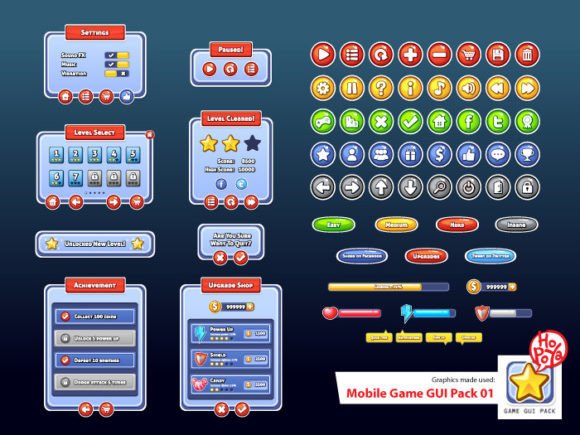
Let's talk about what this specific pack offers and how it can be the foundation for a visually consistent and engaging user experience. At its core, this is a graphical user interface toolkit designed for 2D mobile games. It provides a library of pre-designed, customizable elements that you can drag, drop, and adapt to fit your game's unique aesthetic. Instead of staring at a blank canvas, you start with a professional set of building blocks.
More Than Just Buttons: A System for Visual Consistency
The strength of a good GUI pack lies in its systematic approach. This isn't a random collection of graphics; it's a unified design system. The pack includes over 40 customizable buttons, each available in five different colors. This immediate variety means you can quickly assign different functions—like primary actions, secondary options, and warnings—using color coding, which is a proven method for improving usability. Players intuitively understand that a green button might mean "confirm" and a red one might mean "cancel" or "delete."
Beyond buttons, the inclusion of customizable windows and game elements is crucial. Think about in-game menus, inventory screens, dialog boxes, and health bars. Having these as starting points allows you to maintain a consistent visual language across your entire game. The corner radius of a window, the stroke weight of a border, and the style of an icon all contribute to a unified brand identity for your game. This consistency builds trust with your audience and makes the game feel more polished and intentional.
Practical Applications for Designers and Creators
While the primary use is game development, the utility of these assets extends to various creative and commercial projects. For designers and entrepreneurs, the customizable nature of the files offers tremendous flexibility.
- Brand and Logo Development: The vector AI and EPS files are perfect for crafting custom icons or logotypes. You could adapt a button shape or combine elements to create a unique symbol for your game studio or a related product line.
- Marketing and Social Media Graphics: Create cohesive promotional materials for your game launch. Use the same button styles and color palette in your Instagram stories, Twitter banners, and Facebook ads to reinforce brand recognition. A "Download Now" call-to-action on a social post can mirror the in-game purchase button, creating a seamless journey for the user.
- Packaging and Merchandise: If you plan to sell physical goods like stickers, posters, or apparel related to your game, the high-resolution PNG files and scalable vectors ensure your designs look crisp on any medium. The GUI elements can become part of a larger illustrative composition.
- Websites and Digital Products: The visual style can inform the entire look of your game's official website. Use the same color schemes and typographic choices (the pack notes the Aller Display font) to create a landing page that feels like a natural extension of the game itself. This is key for building a strong brand identity.
Making Smart Design Choices with Included Assets
Having the files is one thing; using them effectively is another. Here’s some practical advice for integrating this pack into your workflow. First, always start with your project's goals. Are you creating a casual puzzle game with a friendly vibe? You might lean into the brighter color options and rounded elements. For a sci-fi strategy game, you could customize the windows with sharper edges and use a more limited, cooler color palette from the provided set.
The pack includes vector files (AI and EPS) and transparent PNGs. Use the vector formats for any design work that needs to be scaled, like print materials or high-resolution screens. The PNGs are ideal for direct import into game engines like Unity or Godot. A pro tip: before you start customizing, duplicate your master files. This way, you always have a clean original to return to if you want to explore a different direction.
Regarding the specified font, Aller Display, it’s a clean and modern sans serif typeface that works well for user interfaces. Its clarity is a major asset for readability on small mobile screens. However, the pack's true value is in the graphical assets. You can always pair it with another complementary font for different text elements—like using a script font for a game title and the sans serif for all functional text—to add personality while maintaining legibility.
Streamlining Your Creative Process
Ultimately, the goal of a resource like this is to remove friction from the creative process. It allows a solo developer, a small studio, or a freelance designer to allocate more time and energy to the unique aspects of their project—the gameplay, the narrative, the code—rather than getting bogged down in the minutiae of interface pixel-pushing. The professional presentation of a well-designed GUI can significantly impact first impressions and player retention. It signals quality and care, which helps in building audience engagement from the very first tap.
Before purchasing any design asset, it's wise to consider commercial licensing. Ensure the license allows for your intended use, whether it's for a single indie game, multiple client projects, or merchandise. This pack, by providing industry-standard file formats, positions itself as a serious tool for commercial work, giving you the assets you need to build, market, and sell your creative vision with confidence.